Google Gemini Prompt for Women's Professional Studio Portrait & Corporate Branding Photography

Andy.B
Aug 18, 2026
Prompt Copied:
0
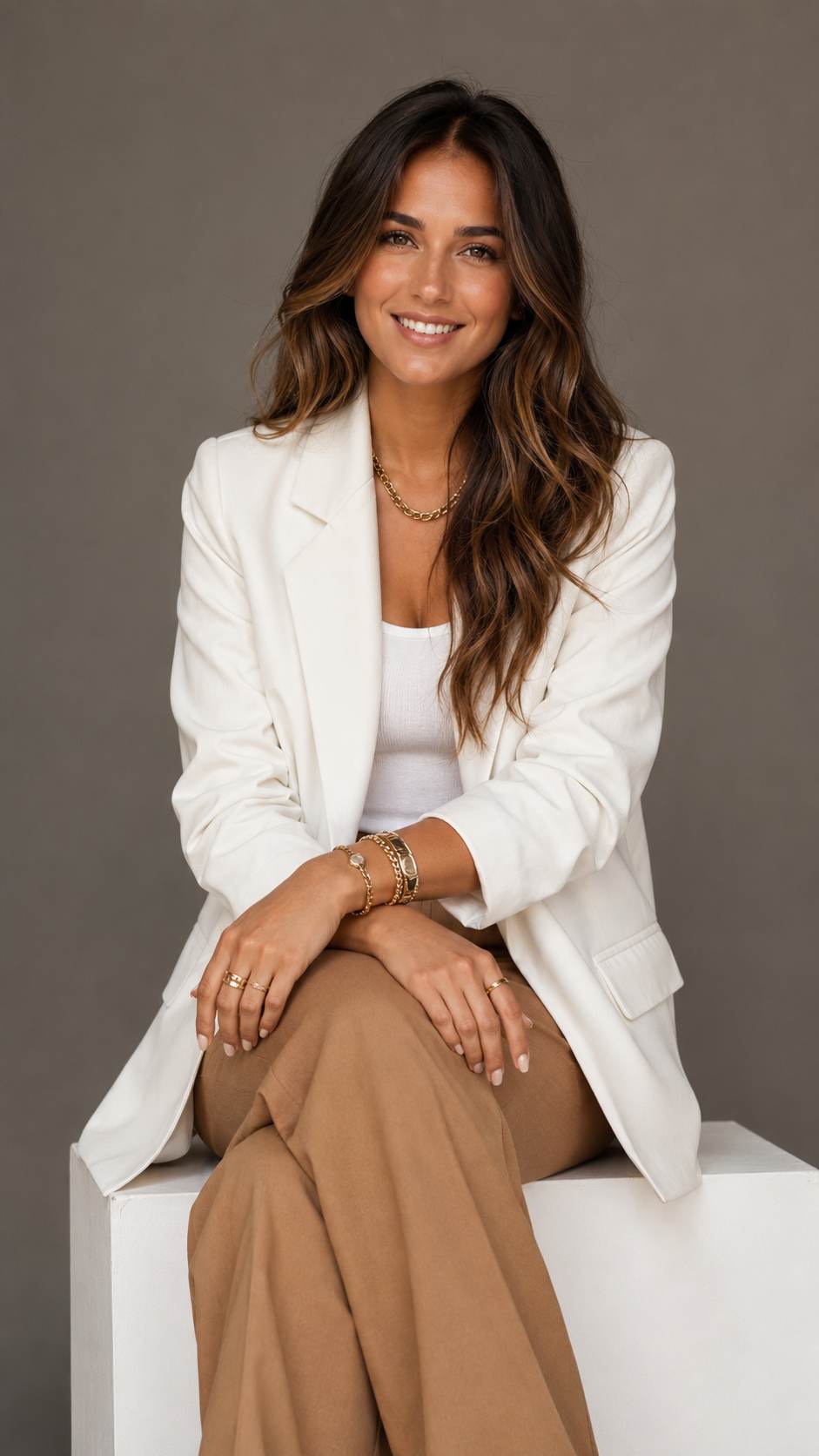
Want to create polished, editorial-style portraits using AI the kind you'd normally pay a professional photographer hundreds of dollars for? With Google Gemini, you can generate stunning corporate branding photos in seconds, just by using the right prompt.
In this tutorial, we'll walk you through a ready-to-use prompt that generates a photorealistic studio portrait featuring soft studio lighting, a neutral backdrop, and a polished corporate aesthetic perfect for LinkedIn profiles, personal branding, business websites, or social media.
Why This Prompt Works
The key to getting realistic, high quality AI portraits is specificity. This prompt includes details on:
Pro TipWant a male version, or a different pose or outfit? Simply swap out the wardrobe and hair details while keeping the studio lighting, background, and photography style keywords the same. That's the part doing the heavy lifting for realism.
In this tutorial, we'll walk you through a ready-to-use prompt that generates a photorealistic studio portrait featuring soft studio lighting, a neutral backdrop, and a polished corporate aesthetic perfect for LinkedIn profiles, personal branding, business websites, or social media.
Why This Prompt Works
The key to getting realistic, high quality AI portraits is specificity. This prompt includes details on:
- Pose and composition: a natural, relaxed seated pose with a three-quarter body shot
- Wardrobe styling: a tailored blazer and coordinated outfit for a professional look
- Lighting and background: soft, diffused studio lighting against a neutral grey backdrop
- Photography style cues: terms like "85mm lens," "shallow depth of field," and "editorial feel" that push Gemini toward a more photorealistic, camera-shot result rather than an illustrated or "AI-looking" image
- Open Google Gemini, ChatGPT or any other AI Photo generation tool and start a new chat with image generation enabled.
- Paste the prompt exactly as written above.
- Generate your image it will typically produce a realistic studio style portrait matching the description.
- If you want variations, tweak individual details like hair color, outfit color, or pose while keeping the lighting and background language intact that's what keeps the professional "branding photoshoot" look consistent.
Pro TipWant a male version, or a different pose or outfit? Simply swap out the wardrobe and hair details while keeping the studio lighting, background, and photography style keywords the same. That's the part doing the heavy lifting for realism.